Running Qwen Image Edit 2509 GGUF + 4 Step Lightning on a Mac with 64GB of RAM
ARTICLE IMAGING DESIGN TOOLS
December 2, 2025
So basically when I discovered Qwen-Image-Edit, I wanted to try it out. But in my case I have: 1 PC with an AMD eGPU with 8 GB of RAM, and a Macbook M1 Max with 64 GB of RAM.
This model is huge, and thus the PC with the 8GB AMD eGPU was not an option. So I went with the Macbook approach.
I tried:
Stable Diffussion CPP
https://github.com/leejet/stable-diffusion.cpp
My initial tryout was pretty bad. It took forever and I had to stop it. After investigating, it seemed that the published binary for macOS is built for CPU. No metal included, so it is slow as hell.
So the first thing I did was to compile it for metal:
cd ~/src/stable-diffusion.cpp/build
cmake .. -DSD_METAL=ON -DCMAKE_BUILD_TYPE=Release
cmake --build . --config Release -j$(sysctl -n hw.ncpu)
With that, it run faster, but failed with errors like:
ERROR] ggml_extend.hpp:75   - ggml_metal_op_encode_impl: error: unsupported op 'PAD'
/Users/soywiz/projects/stable-diffusion.cpp/ggml/src/ggml-metal/ggml-metal-ops.cpp:201: unsupported op
(lldb) process attach --pid 93032
Process 93032 stopped
* thread #1, queue = 'com.apple.main-thread', stop reason = signal SIGSTOP
    frame #0: 0x000000019aa9e42c libsystem_kernel.dylib__wait4 + 8
libsystem_kernel.dylib__wait4:
->  0x19aa9e42c <+8>:  b.lo   0x19aa9e44c    ; <+40>
But I managed to get it working by using --vae-on-cpu --clip-on-cpu flags. But I was not able to provide the 4 step lighting lora, as it is not supported right now.
time ./sd \
  --diffusion-model diffusion_models/Qwen-Image-Edit-2509-Q8_0.gguf --vae-on-cpu --clip-on-cpu \
  --vae vae/qwen_image_vae.safetensors \
  --qwen2vl text_encoders/Qwen2.5-VL-7B-Instruct.Q8_0.gguf \
  --qwen2vl_vision text_encoders/Qwen2.5-VL-7B-Instruct.mmproj-Q8_0.gguf \
  --cfg-scale 2.5 \
  --sampling-method euler \
  --diffusion-fa \
  --flow-shift 3 \
  -v \
  -r qwen_image_edit_2509.png \
  -p "change 'flux.cpp' to 'Qwen Image Edit 2509'"
I also tried to compile to to Vulkan using MoltenVK since maybe that's a bit more mature:
brew install vulkan-headers glslang molten-vk shaderc
mkdir build
cd build

cmake .. \
  -DSD_VULKAN=ON \
  -DSD_METAL=OFF \
  -DVulkan_INCLUDE_DIR=/opt/homebrew/include \
  -DVulkan_LIBRARY=/opt/homebrew/lib/libMoltenVK.dylib
cmake --build . --config Release -j
Then run it with:
time ./sd --width 512 --height 512 --lora-model-dir lora --lora-apply-mode immediately \
  --diffusion-model Qwen-Image-Edit-2509-Q4_K_S.gguf \
  --vae qwen_image_vae.safetensors \
  --qwen2vl Qwen2.5-VL-7B-Instruct.Q8_0.gguf \
  --qwen2vl_vision Qwen2.5-VL-7B-Instruct.mmproj-Q8_0.gguf \
  --cfg-scale 2.5 \
  --sampling-method euler \
  --diffusion-fa \
  --flow-shift 3 \
  -v \
  -r qwen_image_edit_2509.png \
  -p "change 'flux.cpp' to 'Qwen Image Edit 2509'"
The thing is that in both cases we couldn't use the 4-step-lighting lora, so one change (20 steps) takes around 9 minutes with --vae-on-cpu --clip-on-cpu
and around 20 minutes with the vulkan backend.
Draw Things
While investigating I came into Draw Things: https://drawthings.ai/ this one is really cool. It works super fast and it is pretty good. I managed to get a working configuration for it and also for wan 2.2. But I found a few problems: it only works on mac, it is GUI only and only supports one input image. One of the cool things of Qwen-Image-Edit is that it supports up to 3 images to have multiple references.
BTW, these are my configurations:
EDIT 4 steps:
{"resolutionDependentShift":false,"refinerModel":"","preserveOriginalAfterInpaint":true,"sharpness":0,"width":1024,"batchSize":1,"sampler":17,"cfgZeroInitSteps":0,"tiledDecoding":false,"maskBlur":1.5,"steps":2,"seedMode":2,"guidanceScale":1,"faceRestoration":"","upscaler":"","model":"qwen_image_edit_2509_q8p.ckpt","hiresFix":false,"tiledDiffusion":false,"loras":[{"mode":"all","file":"qwen_image_edit_2509_lightning_4_step_v1.0_lora_f16.ckpt","weight":1}],"maskBlurOutset":0,"height":1024,"shift":2.3100000000000001,"seed":811693728,"cfgZeroStar":false,"strength":1,"batchCount":1,"causalInferencePad":0,"controls":[]}
WAN 2.2 image:
{"refinerModel":"wan_v2.2_a14b_lne_t2v_q6p_svd.ckpt","preserveOriginalAfterInpaint":true,"sharpness":0,"width":1408,"batchSize":1,"sampler":15,"teaCacheMaxSkipSteps":3,"cfgZeroInitSteps":0,"tiledDecoding":false,"maskBlur":1.5,"steps":6,"seedMode":2,"guidanceScale":1,"faceRestoration":"","upscaler":"","model":"wan_v2.2_a14b_hne_t2v_q6p_svd.ckpt","teaCache":true,"hiresFix":false,"teaCacheEnd":-2,"refinerStart":0.10000000000000001,"tiledDiffusion":false,"loras":[{"mode":"all","file":"wan_2.1_14b_self_forcing_t2v_v2_lora_f16.ckpt","weight":1}],"teaCacheThreshold":0.22,"maskBlurOutset":0,"numFrames":1,"height":768,"shift":0.66000000000000003,"seed":1916676641,"teaCacheStart":3,"cfgZeroStar":false,"batchCount":1,"strength":1,"causalInferencePad":0,"controls":[]}
ComfyUI:
I stumbled upon this: https://github.com/ModelTC/Qwen-Image-Lightning
Here there are both python scripts and comfyUI workflows. The problem is that the qwen-image-edit model here uses the qwen_image_edit_fp8_e4m3fn.safetensors model and MPS backend (the one for Mac Metal) doesn't support this kind of tensors types. And thus, when loading on MPS it ends being converted on the fly to float16 or float32, using twice or four times the memory it should use. And then the model doesn't fits in memory, and the mac ends using swap memory, it takes forever and degrades SSD lifespan. So this was not an option.
Since there are GGUF quantized models, I investigated a lot. And it seems it is not possible to directly load those models on python right now, and it is a complicated story, and the MPS backend doesn't support those types in theory.
But what we have is a GGUF loader for ComfyUI: https://github.com/city96/ComfyUI-GGUF
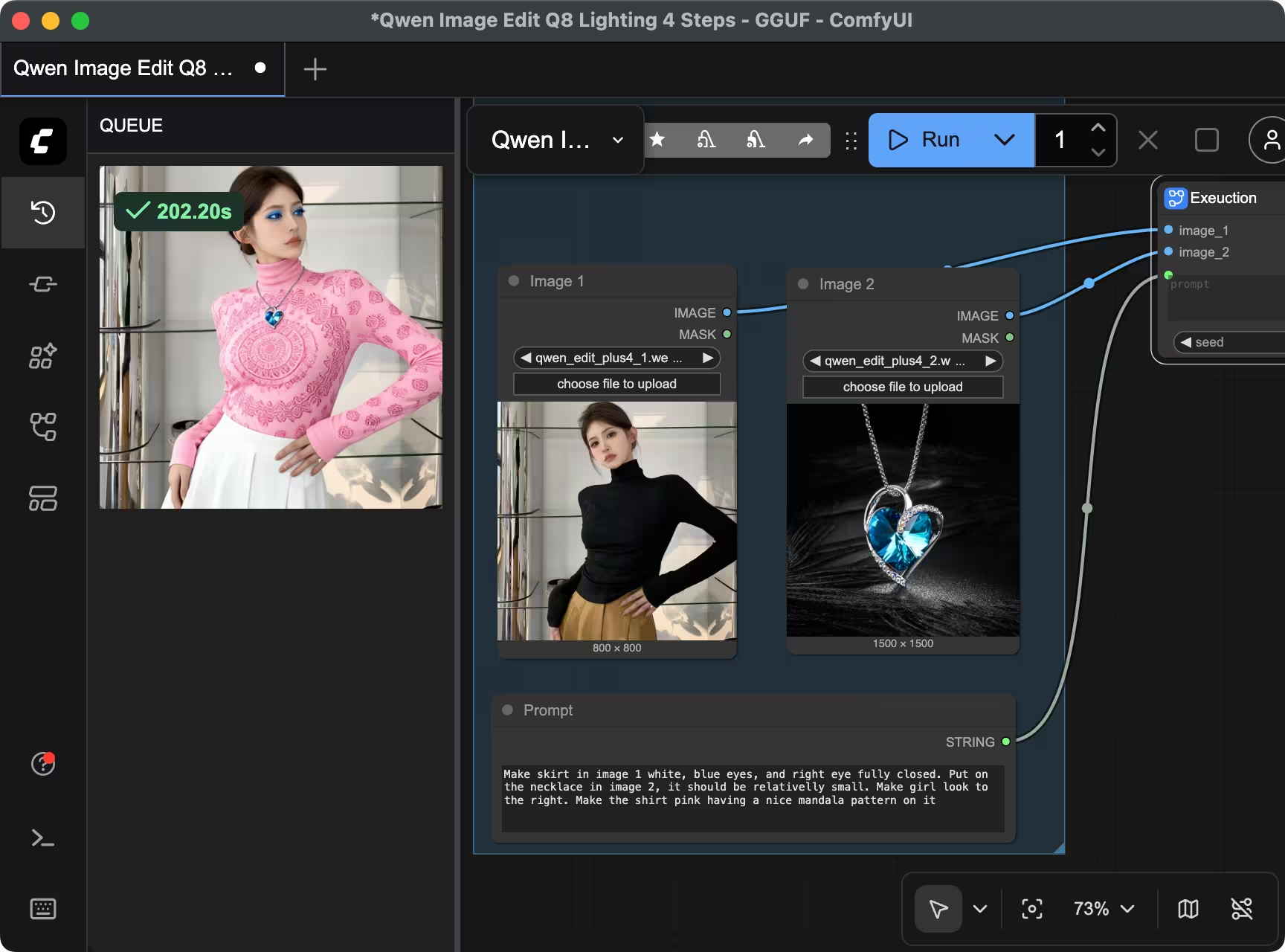
And after a lot of work, I managed to get it working. It is slower than Draw Things, but at least much faster than the whole pipeline than we had right now with Stable Diffusion CPP. And in around 3~4 minutes we can get a modified image from two input images and a prompt suing it.
I created a PR with this workflow: https://github.com/ModelTC/Qwen-Image-Lightning/pull/66
And here an example of the workflow:
Extra: Upscayl
BTW, even if unrelated, in my investigations I discovered Upscayl. I used other tools for this, like waifu2x or https://github.com/xinntao/Real-ESRGAN-ncnn-vulkan on the CLI, but this one is pretty cool. Useful links:
- https://github.com/upscayl/upscayl/releases <-- GUI
- https://github.com/upscayl/upscayl-ncnn/releases <-- CLI
- https://github.com/upscayl/custom-models/tree/main/models <-- Custom Models
- https://github.com/upscayl/upscayl/tree/main/resources/models <-- Integrated Models
Extra: Affinity
During this Journey. I also discovered that Canva bought the Affinity suite. And that now there is a single Affinity app instead of Affinity Photo, Affinity Design and Affinity Publish. Also now it is free, with all the features it used to have for the Affinity 2 suite, and new ones that are now part of the Canvas Pro subscription.
Extra: chaiNNer
I also discovered this: https://github.com/chaiNNer-org/chaiNNer
It looks promising. Similar to ComfyUI, but the UI itself looks much nicer. And it is a pretty generic tool for graph-based image manipulation.
Summary:
It was interesting to experiment with this and found out a few really nice projects; and Qwen Image Edit is literally amazing. Now just with one or a few images, and a prompt you can make changes directly locally and unlimited and it is stunning how well does it work.
PS: I wrote this article using Capydocs.
Comments
Comments are powered by GitHub via utteranc.es.